Consignment Agreements
Context
Consignment agreements define the relationship between a device owner (Axis Mobile) and a consignee/seller (Reyder Enterprises). The owner entrusts devices to the consignee to sell, and they split the revenue based on commission terms defined in the agreement.
What is Consignment?
In this module, consignment means:
- Owner (Axis Mobile,
id=2): Owns the devices, wants them sold on their behalf. - Consignee (Reyder Enterprises,
id=1): Receives and sells the devices on behalf of the owner. - When a device sells, the revenue is split: the owner gets
(sale_price - commission), and the consignee keeps the commission. - The financial reconciliation is tracked via paired settlement reports — one report for each party.
The agreement is the foundational record that makes this flow possible. Without an active agreement, Reyder cannot see or sell Axis Mobile's devices.
Creating an Agreement
Path: Device Inventory → Consignment → Agreements → New
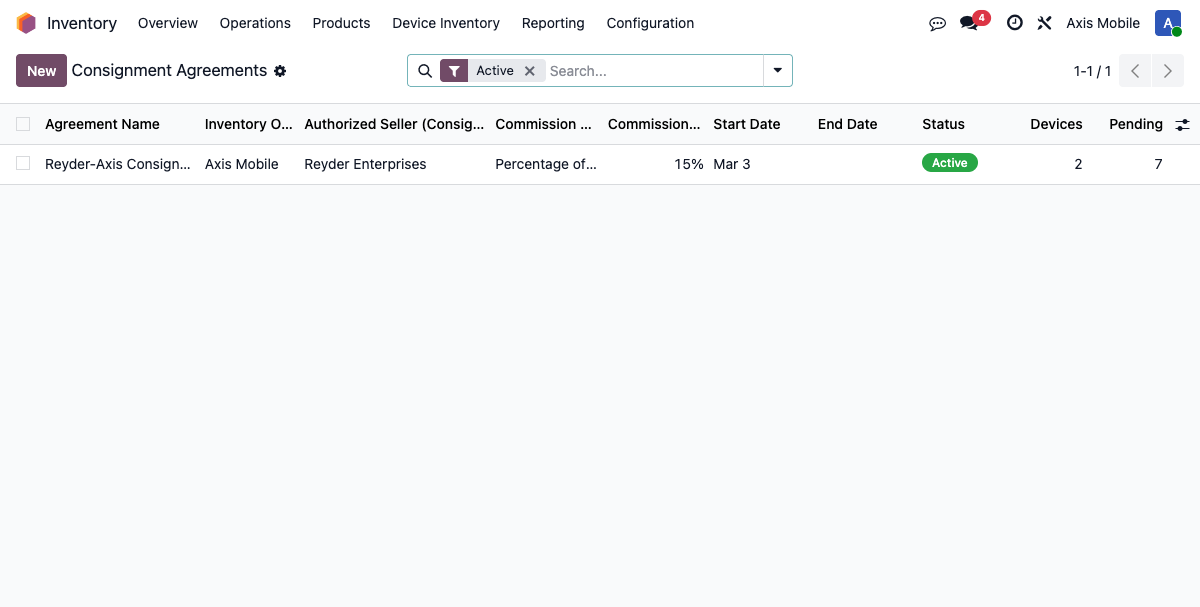
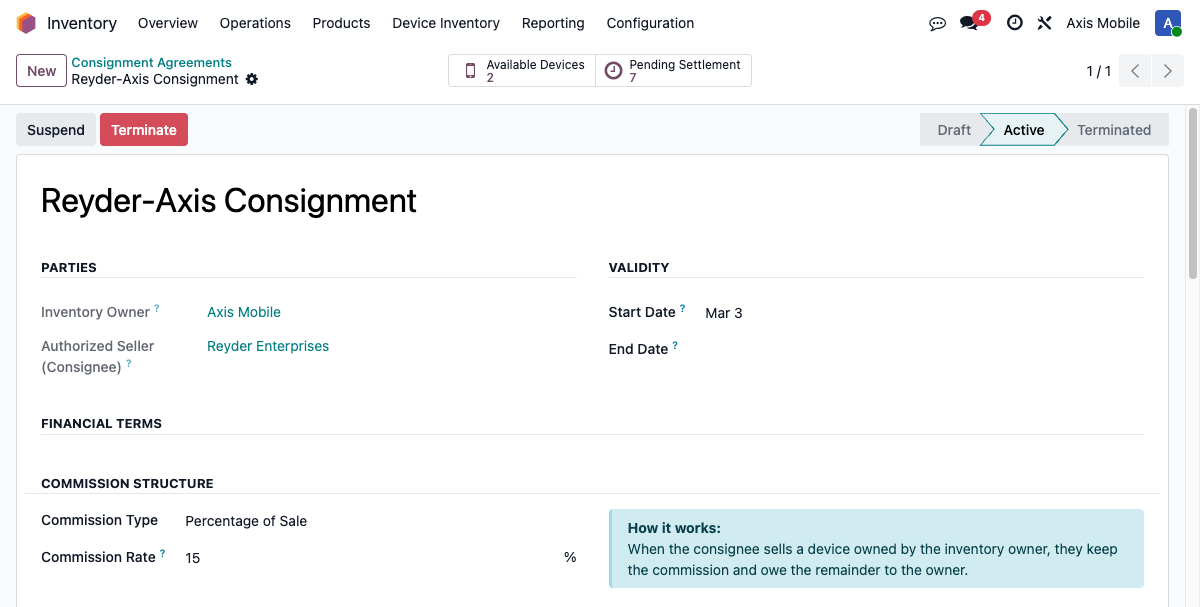
Required Fields
| Field | Description |
|---|---|
| Agreement Name | Descriptive name for the agreement — required on create (e.g., "Reyder-Axis Consignment Q1 2026") |
| Inventory Owner | Company that owns the devices (e.g., Axis Mobile) |
| Authorized Seller (Consignee) | Company authorized to sell the devices (e.g., Reyder Enterprises) |
| Commission Type | none, percentage, or fixed |
| Commission Rate | Decimal for percentage (0.15 = 15%), or dollar amount for fixed |
| Status | Agreement lifecycle state: draft, active, suspended, terminated |
Optional Fields
| Field | Description |
|---|---|
| Start Date | Date the agreement takes effect (defaults to today) |
| End Date | Optional expiry date — leave blank for an indefinite agreement |
| Owner Sees Device Status | Whether the owner can see available / reserved / sold status on their devices |
| Owner Sees Commission Earned | Whether the owner can see commission amounts on sold devices |
| Terms & Conditions | Free-text notes field for legal or operational terms |
Commission Types
1. None
No commission is charged. The owner receives the full sale price.
commission_amount = 0owner_amount = sale_price
Use case: Internal transfers or arrangements where Reyder waives its fee.
2. Percentage of Sale
Commission is calculated as a percentage of the device sale price.
- The
commission_ratefield stores the rate as a decimal:0.15represents 15%. - Odoo 19's percentage widget automatically multiplies by 100 for display, so
0.15is shown as "15%" in the UI. - Do not enter
15for 15% — enter0.15.
Calculation:
Example:
| Sale Price | Commission Rate | Commission | Owner Gets |
|---|---|---|---|
| $800.00 | 0.15 (15%) | $120.00 | $680.00 |
| $600.00 | 0.20 (20%) | $120.00 | $480.00 |
| $450.00 | 0.10 (10%) | $45.00 | $405.00 |
3. Fixed Amount per Unit
A fixed dollar amount is charged per device, regardless of the sale price.
commission_ratestores the fixed dollar amount.- The commission is capped at the sale price to prevent a negative
owner_amount.
Calculation:
Example:
| Sale Price | Fixed Commission | Commission | Owner Gets |
|---|---|---|---|
| $800.00 | $50.00 | $50.00 | $750.00 |
| $300.00 | $50.00 | $50.00 | $250.00 |
| $40.00 | $50.00 | $40.00 | $0.00 |
Commission Calculation Method
The calculate_commission(sale_price, currency) method on device.consignment.agreement performs the calculation and returns a tuple.
Signature:
agreement.calculate_commission(sale_price, currency=None)
# Returns: (commission_amount, owner_amount)
Behavior:
- Accepts an optional currency argument for rounding precision. Defaults to the current company's currency.
- Uses odoo.tools.float_round with the currency's rounding value to avoid floating-point precision errors.
- Returns (0.0, 0.0) when sale_price is zero or negative.
Example (Python shell):
agreement = env['device.consignment.agreement'].browse(1)
commission, owner_amount = agreement.calculate_commission(800.00)
# commission = 120.0, owner_amount = 680.0  (assuming 15% rate)
Agreement States
+-------+    +--------+    +-----------+    +------------+
| draft | -> | active | -> | suspended | -> | terminated |
+-------+    +----+---+    +-----+-----+    +------------+
                  ^               |
                  |               | (reactivate)
                  +---------------+
| State | Description | Consignment Sales Allowed |
|---|---|---|
draft |
Newly created, not yet in effect | No |
active |
Agreement is in force | Yes |
suspended |
Temporarily paused; no new allocations | No |
terminated |
Permanently ended; no further transactions | No |
State Action Buttons
| Button | Method | Effect |
|---|---|---|
| Activate | action_activate() |
Sets state to active; calls _recompute_device_consignees() to open device visibility |
| Suspend | action_suspend() |
Sets state to suspended; recomputes device visibility |
| Terminate | action_terminate() |
Sets state to terminated; recomputes device visibility |
| Reset to Draft | action_reset_draft() |
Returns state to draft; recomputes device visibility |
Every state change triggers _recompute_device_consignees(), which updates the consignee_company_ids field on all devices owned by the owner company. This is what grants or revokes Reyder's ability to see Axis Mobile's inventory.
Constraints
Unique Owner/Consignee Pair
Only one agreement is allowed between any given owner and consignee:
_unique_agreement = models.Constraint(
    'UNIQUE(owner_company_id, consignee_company_id)',
    'Only one agreement allowed between the same companies',
)
If you need to change commission terms mid-agreement, edit the existing agreement rather than terminating and recreating. Terminating and recreating will briefly remove device visibility for Reyder during the transition.
No Self-Consignment
A company cannot create an agreement with itself:
_no_self_consignment = models.Constraint(
    'CHECK(owner_company_id != consignee_company_id)',
    'A company cannot create a consignment agreement with itself',
)
Date Validation
End date must be after start date. Enforced via _check_dates() on save.
How Agreements Affect Device Visibility
Activating (or terminating) an agreement triggers a recompute of device visibility across all devices owned by the owner company. The mechanism works as follows:
Step-by-Step
action_activate()is called on the agreement._recompute_device_consignees()searches for allstock.lotrecords whereowner_company_id = Axis Mobile.- For each device,
_compute_consignee_companies()runs. This queries all active consignment agreements for the device's owner and collects the consignee company IDs. - The result is stored in
consignee_company_ids(a stored, computed Many2many field) on eachstock.lotrecord. - The record rule
stock_lot_consignment_ruleinsecurity/security.xmluses this field: - Reyder Enterprises users (who belong to company
id=1) can now search and access Axis Mobile'sstock.lotrecords becauseconsignee_company_idsincludesid=1.
Batch Optimization
_compute_consignee_companies() is optimized to avoid N+1 queries. When called on a batch of devices, it runs a single agreement search for all owner companies at once, then distributes the results to each device.
Deletion Behavior
When an agreement is deleted (not just terminated), unlink() captures the owner company IDs before deletion, calls super().unlink(), and then recomputes device visibility after deletion. This ensures stale consignee_company_ids are cleared even when an agreement is hard-deleted rather than terminated.
Impact on Sales Orders
When a Reyder SO allocates an Axis Mobile device to a sale order line, the system:
- Detects that
stock.lot.owner_company_id != env.company(cross-company situation). - Calls
get_active_agreement(owner_company_id, consignee_company_id)to find the active agreement. - Uses the agreement's
calculate_commission()to auto-compute the commission and owner amount on thesale.order.line.deviceallocation record. - Marks the SO line with a consignment indicator (orange highlight in the list view).
The get_active_agreement() method also validates date boundaries — it only returns agreements where today falls within date_start and date_end (or where those dates are unset):
@api.model
def get_active_agreement(self, owner_company_id, consignee_company_id):
    return self.search([
        ('owner_company_id', '=', owner_company_id),
        ('consignee_company_id', '=', consignee_company_id),
        ('state', '=', 'active'),
        '|', ('date_start', '=', False), ('date_start', '<=', fields.Date.today()),
        '|', ('date_end', '=', False), ('date_end', '>=', fields.Date.today()),
    ], limit=1)
Impact on Settlement Reports
When a delivery manifest is marked complete, _process_customer_delivery() auto-creates two paired settlement reports:
- Owner report (
report_type = 'owner',company_id = Axis Mobile): Contains IMEI, model, storage, grade, commission amount, and owner amount. Does not contain customer name, sale price, or SO number. - Consignee report (
report_type = 'consignee',company_id = Reyder Enterprises): Contains full details including customer, SO reference, and sale price.
The commission amounts on these reports are computed using the agreement's calculate_commission() method at the time of delivery.
Both reports are created using .sudo() to handle the multi-company ownership difference — the owner report belongs to Axis Mobile's company context.
For full settlement report documentation, see settlement-reports.md.
Agreement Statistics (Smart Buttons)
The agreement form shows three computed counters:
| Counter | Field | Description |
|---|---|---|
| Consigned Devices | consigned_device_count |
Axis Mobile devices currently available in stock |
| Sold via Consignment | sold_device_count |
Devices with device_status = sold and sold_by_company_id = Reyder |
| Pending Settlement | pending_settlement_count |
Devices sold but with settlement_status = pending |
Clicking Consigned Devices opens a filtered list of all available Axis Mobile devices. Clicking Pending Settlement opens a filtered list of sold devices awaiting payment.
Key Fields Reference
| Model | Field | Type | Description |
|---|---|---|---|
device.consignment.agreement |
name |
Char | Agreement name — required |
device.consignment.agreement |
owner_company_id |
Many2one res.company |
Company that owns the inventory |
device.consignment.agreement |
consignee_company_id |
Many2one res.company |
Company authorized to sell |
device.consignment.agreement |
commission_type |
Selection | none, percentage, fixed |
device.consignment.agreement |
commission_rate |
Float (16,4) | Decimal rate or fixed amount |
device.consignment.agreement |
state |
Selection | draft, active, suspended, terminated |
device.consignment.agreement |
date_start |
Date | Effective start date |
device.consignment.agreement |
date_end |
Date | Optional expiry date |
stock.lot |
consignee_company_ids |
Many2many res.company |
Stored computed — companies allowed to sell this device |
stock.lot |
is_consignment_device |
Boolean | True when device owner != current company AND current company is an authorized consignee |
Common Workflows
Changing Commission Rate
- Navigate to Device Inventory → Consignment → Agreements.
- Open the active agreement.
- Edit the Commission Rate field directly.
- Save.
Existing sold devices and settlement reports are not retroactively affected — they store the commission amounts at the time of sale. Only future allocations and deliveries will use the new rate.
Suspending an Agreement Temporarily
- Open the agreement form.
- Click Suspend.
- The agreement enters
suspendedstate._recompute_device_consignees()runs, but devices owned by the suspended agreement's owner retain visibility to the consignee as long as another active agreement exists. If this is the only agreement, devices are no longer visible. - To resume, click Activate.
Terminating and Replacing an Agreement
If commission terms need to change and you want a clean break:
- Click Terminate on the existing agreement. Device visibility for the consignee is cleared.
- Because of the unique constraint, you cannot create a new agreement between the same two companies while the old one exists. You must either:
- Edit the existing agreement (change commission fields, then reactivate), or
- Delete the terminated agreement first, then create a new one.
Editing and reactivating is the recommended approach to preserve historical records.
Last updated: 2026-03-04 | Module version: 19.0.2.14.0