Accounting Reference
Who this is for
Accountants, auditors, and developers verifying what the system posts to the GL.
This page lists every journal entry the module creates, what triggers it, and which model fields store the link. Use it when reconciling, investigating a posted move, or setting up the chart of accounts for a new install.
Where accounts are configured
Settings → Inventory → Device Inventory Accounting
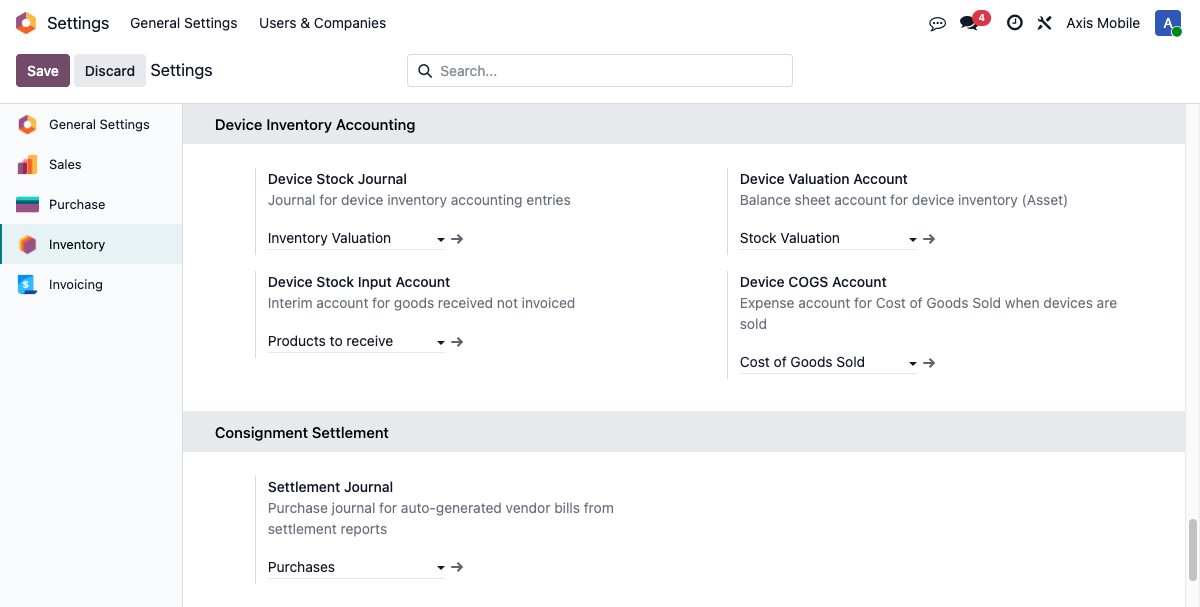
| Setting | Account type | What it's for |
|---|---|---|
| Device Stock Journal | General journal | Every non-sale-non-purchase entry the module posts |
| Device Valuation Account | Asset — Current | Balance-sheet inventory value of devices held |
| Device Stock Input Account | Liability / Expense | Goods Received Not Invoiced (GRNI) clearing |
| Device COGS Account | Expense | Cost of Goods Sold when devices ship |
| Settlement Journal | Purchase journal | Vendor bills generated from settlement reports |
Configure all five before using the module in production. Failure behavior is asymmetric across entries — v2.28 tightened COGS and retail-invoice posting into hard errors, but receiving-GL and settlement-bill paths still soft-fail with a chatter warning if their config is missing. See the per-entry details and the Failure modes section below.
The full list of entries
| # | Entry | DR | CR | Journal | Trigger |
|---|---|---|---|---|---|
| 1 | Inventory Receipt | Valuation | GRNI Input | Device Stock | Receiving manifest marked complete |
| 2 | Delivery COGS | COGS | Valuation | Device Stock | Delivery manifest completes (packing box ships) |
| 3 | Customer Invoice | AR | Revenue | Sales | Delivery manifest completes |
| 4 | Retail COGS | COGS | Valuation | Device Stock | Retail sale confirmed |
| 5 | Retail Invoice | AR | Revenue | Sales | Retail sale confirmed |
| 6 | Settlement Vendor Bill | AP Clearing | AP | Settlement | Consignee settlement report confirmed |
| 7 | Packing Box COGS | COGS | Valuation | Device Stock | Packing box marked shipped |
| 8 | Inter-company Mirror Bill | AP | AP Clearing | Purchase (destination) | Inter-company out_invoice posted |
Entries 2 and 7 are the same entry from different triggers — only one posts per delivery (the system keys on manifest.cogs_move_id to avoid double-posting).
Entry details
1. Inventory Receipt (on receiving)
| Entry | DR Valuation / CR GRNI Input |
| Amount | Sum of purchase_cost across all received manifest lines |
| Journal | Device Stock Journal |
| Triggered by | _create_inventory_accounting_entry() in device_manifest.py |
| Fires when | You click Mark Complete on a receiving manifest |
| Stored on | device.manifest.account_move_id |
| Auto-posted | Yes |
| Idempotent | Yes — skips if account_move_id already set |
| Missing config | Soft-fail — posts a chatter warning listing missing fields and returns without creating the entry. Manifest still transitions to Done. |
2. Delivery COGS
| Entry | DR COGS / CR Valuation |
| Amount | Sum of purchase_cost across delivered devices |
| Journal | Device Stock Journal |
| Triggered by | _create_cogs_accounting_entry() in device_manifest.py |
| Fires when | Delivery manifest's _process_customer_delivery() runs — either via the packing box being marked shipped or the manifest's own Mark Complete (if no box) |
| Stored on | device.manifest.cogs_move_id |
| Auto-posted | Yes |
| Idempotent | Yes — skips if cogs_move_id already set |
| Missing config | UserError (hard-fail) |
3. Customer Invoice
| Entry | Standard Odoo — DR AR / CR Revenue + tax lines |
| Amount | Per SO line at its sale price |
| Journal | Customer's sales journal (standard Odoo routing) |
| Triggered by | _create_customer_invoice() — uses Odoo's sale.order._create_invoices() |
| Fires when | Delivery manifest completes |
| Stored on | device.manifest.customer_invoice_id |
| Auto-posted | Yes |
4. Retail COGS
| Entry | DR COGS / CR Valuation |
| Amount | Sum of purchase_cost across retail sale devices |
| Journal | Device Stock Journal |
| Triggered by | _create_retail_cogs_entry() in device_retail_sale.py |
| Fires when | Retail sale action_confirm() |
| Stored on | device.retail.sale.cogs_move_id |
| Auto-posted | Yes |
| Missing config | UserError (hard-fail as of v2.28) |
5. Retail Invoice
| Entry | DR AR / CR Revenue — no tax lines |
| Amount | Per device at the recorded sale price |
| Journal | Sales journal |
| Triggered by | _create_retail_invoice() in device_retail_sale.py |
| Fires when | Retail sale confirmed |
| Stored on | device.retail.sale.invoice_id |
| Auto-posted | Yes |
6. Settlement Vendor Bill
| Entry | DR AP Clearing / CR AP (payable to owner company's partner) |
| Amount | consignment.settlement.report.total_owner_amount |
| Journal | Settlement Journal (fallback: first available purchase journal) |
| Triggered by | _create_settlement_vendor_bill() in consignment_settlement_report.py |
| Fires when | Consignee settlement report is confirmed AND total_owner_amount > 0 |
| Stored on | consignment.settlement.report.vendor_bill_id |
| Context | Runs under .sudo().with_company(consignee) |
| Auto-posted | Yes |
| Missing config | Soft-fail — if neither settlement_journal_id nor any purchase journal exists, posts a chatter warning and returns without creating the bill. The settlement report stays confirmed. |
Mark as Paid on the settlement report is a later reconciliation step. It requires the linked vendor bill to have payment_state == 'paid'; posting the bill alone is not enough.
7. Packing Box COGS
Same entry as #2 (Delivery COGS). Triggered from the packing-box side of the unified delivery flow. Keys on delivery_manifest_id.cogs_move_id so multi-box orders still post per-box COGS correctly.
8. Inter-company Mirror Bill
| Entry | DR AP / CR AP Clearing in destination company |
| Amount | Sourced from the originating out_invoice |
| Journal | Destination company's purchase journal |
| Triggered by | _create_intercompany_bill() in account_move.py |
| Fires when | An inter-company out_invoice is posted |
| Stored on | account.move.intercompany_bill_id |
| Context | Cross-company write, validated against destination authorization |
| Auto-posted | No — left as draft for destination accounting to review |
v2.28 tightened this: explicit currency conversion using the header currency_id, row-level lock and re-check to prevent duplicate bills on retry, missing-config errors are raised instead of swallowed.
Worked example: a consignment sale
A consigned iPhone with $500 purchase cost, sold for $800 at 15% commission.
CPA review pending
This module currently keeps the existing gross-sale workflow for Axis-owned devices: customer invoice, COGS, and a settlement vendor bill. Reyder still needs CPA sign-off on principal-vs-agent treatment before using these reports as final GAAP revenue presentation.
1. Receiving (when Reyder receives the phone from supplier)
| Account | DR | CR |
|---|---|---|
| Device Valuation | $500 | |
| Device Stock Input (GRNI) | $500 |
2. Delivery COGS (when Reyder ships to customer)
| Account | DR | CR |
|---|---|---|
| Device COGS | $500 | |
| Device Valuation | $500 |
3. Customer Invoice
| Account | DR | CR |
|---|---|---|
| Accounts Receivable | $800 | |
| Revenue | $800 |
4. Settlement Vendor Bill (auto-posted the moment the settlement report is confirmed)
Owner amount = $800 − ($800 × 15%) = $680
| Account | DR | CR |
|---|---|---|
| AP Clearing | $680 | |
| Accounts Payable (Axis Mobile) | $680 |
Net result — Reyder's P&L effect is: revenue $800, COGS $500, settlement-to-Axis $680 (recognized as COGS-like settlement expense), retention $120 (gross margin after commission). Axis's side has the mirrored AP and the commission is their net receipt.
Failure modes
Failure behavior depends on which entry is being posted. Verify your configuration against this table — silent failures in receiving/settlement paths can produce workflow state changes without the expected GL impact.
| Entry | Behavior on missing config |
|---|---|
| #1 Inventory Receipt (receiving GL) | Soft-fail. Posts chatter warning on the manifest listing missing fields; manifest still transitions to Done. Stock lands on-hand with no GL impact — verify config proactively. |
| #2 Delivery COGS | Hard-fail. UserError lists the missing account(s). Manifest cannot complete. |
| #3 Customer Invoice | Standard Odoo behavior (usually hard-fail if no sales journal — rare since Odoo installs one by default). |
| #4 Retail COGS | Hard-fail (v2.28). UserError lists missing accounting config. Retail sale cannot confirm. |
| #5 Retail Invoice | Hard-fail (v2.28). UserError on missing config. |
| #6 Settlement Vendor Bill | Soft-fail. If neither Settlement Journal nor any purchase-type journal exists in the consignee company, posts a chatter warning on the report and returns. Settlement stays in Confirmed state with no vendor bill. |
| #7 Packing Box COGS | Same as #2 — hard-fail. |
| #8 Inter-company Mirror Bill | Hard-fail on missing destination authorization or config. v2.28 also row-locks to prevent duplicate bills on retry. |
Duplicate-post prevention: all methods check the relevant *_move_id field before creating. A second call with the field already set is a no-op — no error, no double entry.
Under the hood
Technical details for developers
Lock serialization across delivery paths (v2.28)
The packing-box and delivery-manifest completion paths both need to post COGS, and both used to race. v2.28 added sale.order._lock_for_device_delivery() which acquires SELECT ... FOR UPDATE NOWAIT on the SO row before either path posts. Whichever path wins the lock posts COGS; the other sees manifest.cogs_move_id is set and skips. This serializes concurrent deliveries without requiring app-level coordination.
Idempotency
All accounting methods check the relevant *_move_id field before creating:
Inter-company bill duplicate prevention (v2.28)
_create_intercompany_bill():
1. Acquires row-level lock on the source account.move
2. Re-reads intercompany_bill_id under the lock
3. If set, returns early
4. Else creates and writes intercompany_bill_id before releasing
Authorization check
Inter-company mirror bill creation validates self.env.su or self.env.company.id in dest.parent_ids.ids before writing. This blocks an out-of-context cross-company write if something tries to spawn one.
Settlement bill cross-company writing
_create_settlement_vendor_bill() uses:
settlement_journal_id fallback chain: specific setting → any purchase journal → raise.
Currency
All amount writes explicitly pass currency_id on the move header. Line amounts use price_unit and Odoo's standard computation handles the journal-level currency. Inter-company mirror bills re-convert using the destination journal's currency if different.