Settlement Reports
AXIS reviews the settlement, issues its invoice to Reyder, records payment received, and closes its own settlement. Reyder manages its payable separately.
Watch the settlement workflow (4 minutes)
The steps in the video, in order:
- When Reyder delivers Axis-owned phones to a customer, the paired settlement reports are created automatically.
- Axis opens its Owner settlement and reviews the devices and the amount. Under the current Reyder–Axis terms there is no commission: Axis is owed the full sale price.
- Axis clicks Generate Owner Invoice. It creates one untaxed settlement line for the full amount. Do not edit it into device lines, and never create a sales order or fulfillment from it — the phones were already sold once; the system blocks this.
- Axis posts the invoice and records the payment when it is received.
- Axis closes the settlement (Mark as Paid) with the receipt date and reference.
- Reyder's matching vendor bill is the payable side of the same settlement.
What is generated automatically
A completed consignment sale creates two frozen statements:
- AXIS owner report (
SETTLE/OWN/...): IMEIs, device details, Reyder sale prices, and the Total Owner Amount owed to AXIS. No customer, order, sale date, or commission details are exposed. - Reyder consignee report (
SETTLE/CON/...): internal sale and commission details.
New statements do not automatically create or post invoices or vendor bills. Existing bills remain unchanged. A confirmed statement means ready for review, not paid.
AXIS: review → invoice → payment → close
Use an AXIS account with Accounting / Administrator access. Inventory-only users can read statements but cannot issue invoices or confirm payment. No access to Reyder's company is needed for the AXIS workflow.
- Open Device Ops → Consignment → Settlement Reports, then an owner report.
- Review each IMEI and Total Owner Amount. Check whether an invoice has already been issued outside this workflow; do not generate a duplicate.
- Click Generate Invoice and confirm the review. This creates one draft AXIS customer invoice addressed to Reyder, for the amount owed to AXIS—not gross customer sales. The reviewer and review time are saved.
- Review the draft, then Confirm/Post it and send it through the normal invoice controls when appropriate. Generation alone does not post, send, or mark it paid.
- On the settlement, click Record Payment. Enter the amount actually received, actual payment date, and bank reference. The action defaults to an owner-company inbound payment method with an Outstanding Receipts account.
- Reconcile the bank receipt in AXIS Accounting. Partial payments remain open; an In Payment invoice is awaiting bank reconciliation, not yet fully paid.
- When the invoice is fully paid, return to the settlement and click Mark as Paid. Enter the actual receipt date and bank/payment reference, then confirm.
The owner report becomes Paid and the IMEIs in that exact current sale cycle become settled. This does not mark Reyder's bill, report, or customer invoices paid. The invoice's Owner Settlement button returns to its originating statement.
Workflow labels
| AXIS Workflow | Meaning |
|---|---|
| Ready for Review | Statement exists; no AXIS invoice generated |
| Draft Invoice | Review recorded; invoice not posted |
| Awaiting Payment | Invoice posted; payment not fully received/reconciled |
| Partially Paid | Some amount remains due |
| Awaiting Bank Reconciliation | Payment registered but still in payment |
| Payment Received — Close Settlement | Invoice paid; receipt confirmation remains |
| Paid | AXIS confirmed full receipt and closed its statement |
| Invoice Cancelled / Reversed | Accounting correction required |
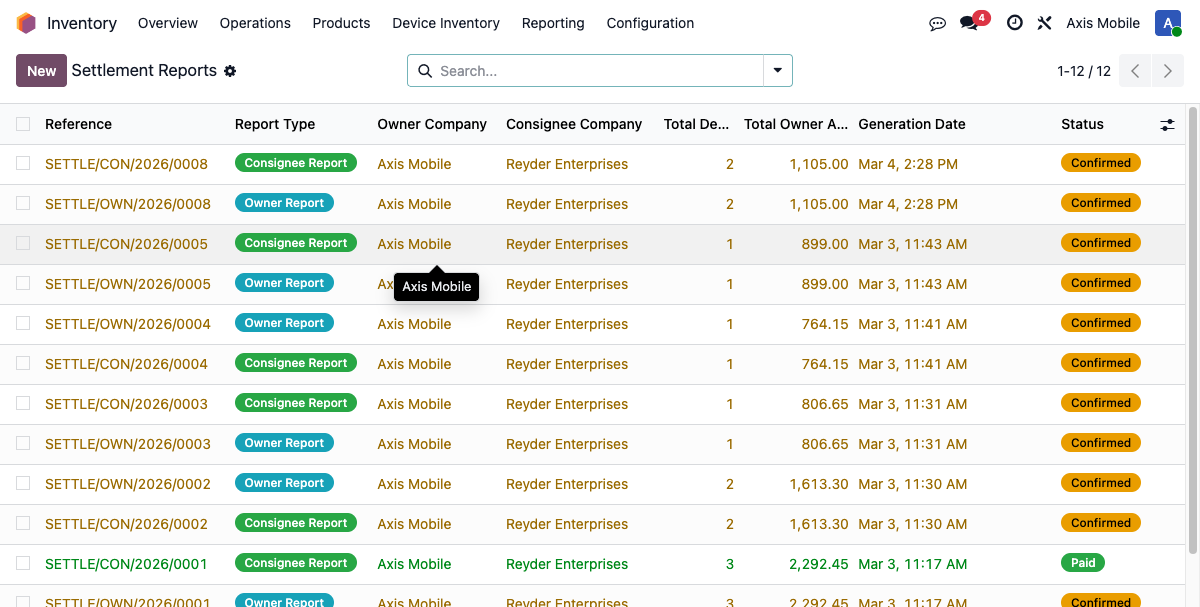
Use the AXIS: Ready for Review and AXIS: Ready to Close filters to find work.
Reyder: preserve or explicitly create the payable
Open the corresponding consignee report in Reyder's company:
- If Vendor Bill exists, use it. AXIS invoice creation and posting never duplicate or replace an existing Reyder payable.
- If it does not exist, wait until AXIS posts its invoice. Accounting can then click Create Vendor Bill to create and post the exact settlement payable. Check for any externally recorded bill before using this action.
- Record/reconcile payment in Reyder's own books. The consignee Mark as Paid action still requires the exact linked vendor bill to be posted and fully paid. It closes only Reyder's report; it cannot confirm AXIS receipt.
The paired reports may legitimately have different paid statuses while each company finishes its bookkeeping. Neither side's payment action fabricates payment on the other.
Corrections and safeguards
- Repeated Generate Invoice clicks open the same invoice; a database uniqueness constraint prevents two invoices for one owner settlement.
- Do not duplicate or delete a linked invoice. Cancel a draft and reset that same invoice to draft when correcting it. Posted reversals/reissues need Accounting review.
- A settlement invoice must retain the correct company, customer, currency, and full owner amount. Changed amounts cannot be posted or used to close the statement.
- Before undoing payment/reconciliation or reversing a closed invoice, use Reopen Settlement. The earlier receipt remains in the chatter audit trail. Reopening does not reverse accounting entries or alter Reyder's bill.
- Do not use the legacy recovery wizard for devices that already have settlement reports.
- Historical pending-device flags are not proof of a documented sale or an amount due. Do not generate invoices merely to clear those flags.
Existing settlements
This release preserves existing reports, invoices, bills, balances, and payment dates. It does not backfill invoices or mark historical balances paid. AXIS must review old statements against any external invoices and actual payment evidence before using the new actions. A balance recorded as unpaid in Odoo is not proof that no money moved.
PDF statements
Download PDF produces the appropriate company-scoped statement. It is supporting settlement evidence, not a substitute for the AXIS customer invoice. Use the invoice's standard print/send controls for the accounting document.