Security & Multi-Company
Who this is for
The operator setting up users, and anyone verifying that the data-separation story actually holds up (e.g. before an audit). Day-to-day users usually don't need this page.
What you'll accomplish: understand who can see what, verify the separation works, and fix access-control problems when they surface.
The business rule in plain English
Two companies share one Odoo database:
- Reyder Enterprises — runs the operation, owns customer relationships, and handles Reyder sales orders and customer invoices. A Reyder-only user sees Reyder records plus consigned devices that an active agreement permits—not every record in both companies.
- Axis Mobile — owns the devices, receives settlement payments. Should see only their own devices and their own owner-settlement reports. The owner report includes Reyder's sale price, but Axis must not see Reyder's customer names, SO numbers, sale dates, commission details, or internal manifests.
This is not a “please don't look” convention. For normal users, Odoo record rules control
ORM operations used by the UI and API. They are not database row-level security: raw
SQL and Odoo SUPERUSER execution can bypass ORM controls, so those capabilities are
restricted to trusted system administrators and sit outside the operator-access boundary.
At-a-glance comparison
| An Axis user sees | A Reyder user sees |
|---|---|
| Their devices (IMEI, model, grade, status) | Reyder devices + permitted Axis devices (via consignment) |
| Their owner-partitioned On-Hand Device Cost rows, even when the Lot Company is Reyder | On-Hand Device Cost rows assigned to Reyder as Lot Company, kept separate by owner |
| Axis owner settlement reports only | Reyder consignee settlement reports only |
| Their consignment agreements | Their consignment agreements |
Reserved state on their devices (via stock.lot) — not the reservation record itself |
Full retail reservations (since Reyder is the holding company) |
| Device traceability (where Axis's devices are) | Full warehouse operations |
| — no customer names | All customer data |
| Reyder sale price on owner settlement reports | All pricing |
| — no SO numbers | All SOs |
| — no Reyder manifests | All manifests |
Set up users the right way
Assign people to the correct company
A user who works for Axis should belong only to Axis. A user who works for Reyder should belong only to Reyder. Only system administrators should belong to both.
Open Settings → Users & Companies → Users and edit the user:
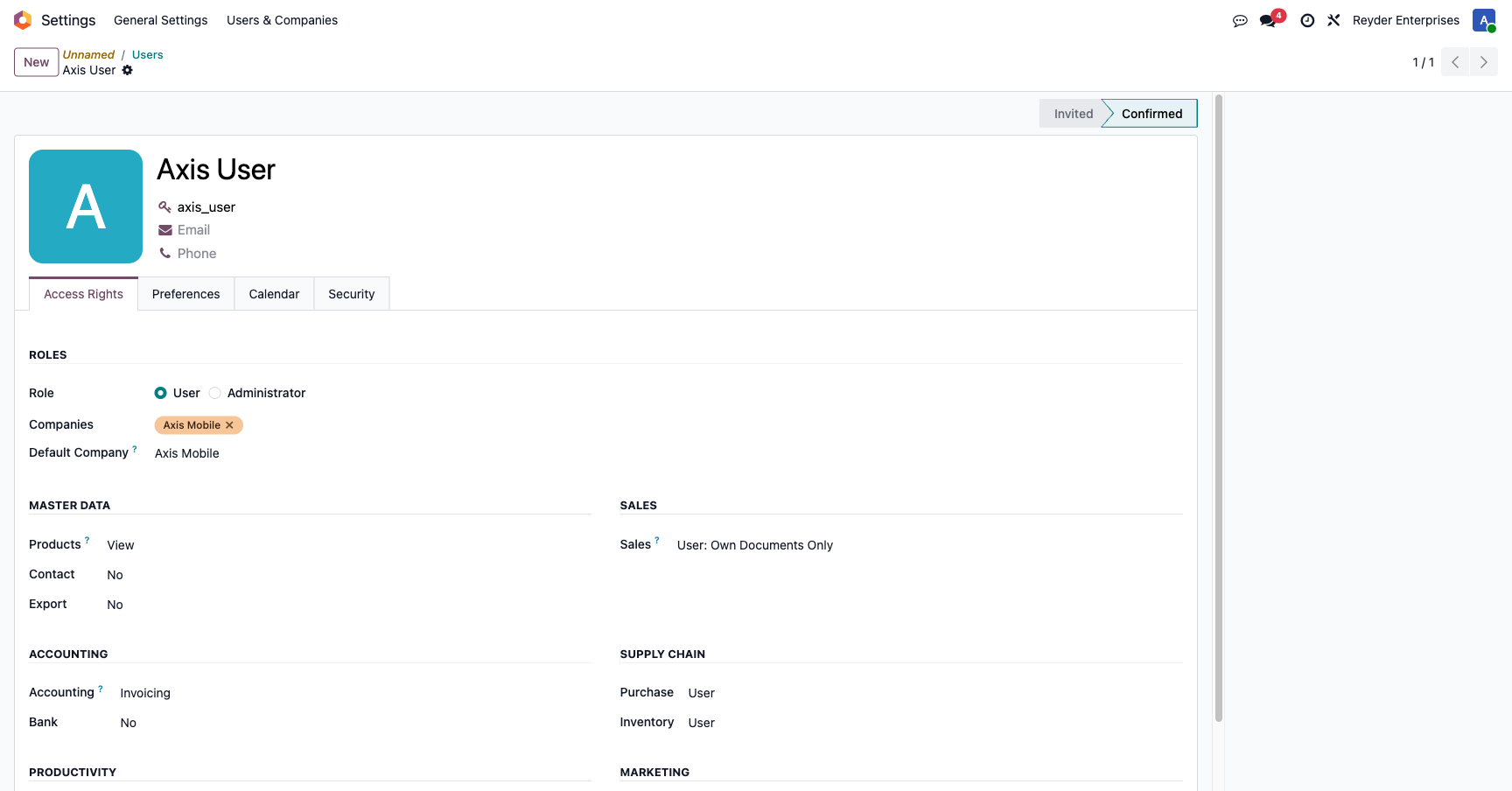
- Companies — tick only the companies this user works for
- Default Company — what they log into
If someone legitimately works for both, they belong to both — and the system will auto-expand their company context (see the gotcha below). But defaulting everyone to both-companies breaks the separation test.
Test profiles
| Account type | Belongs to | Purpose |
|---|---|---|
| Dual-company administrator | Both companies | Administration and authorized cross-company investigation |
| Admin-provisioned Axis test user | Axis Mobile only | Verify that an Axis-only user cannot see Reyder data |
Always test with a real single-company profile
A dual-company administrator is not a valid separation test. Ask an administrator to provision an approved Axis-only test account, keep its password in the approved credential system, and never publish or share that password in a guide.
What enforces the separation
For normal user access, the security boundary combines record rules with model-level data
minimization. One-way links and invisible form fields further reduce accidental exposure,
but they are not independent API/export boundaries and do not replace the first two
controls. Raw SQL and SUPERUSER access remain administrator-only and outside this model.
Layer 1 — Record rules (the primary enforcement)
Odoo record rules filter ORM reads and writes made through the normal UI and API. The module adds these rules on top of the stock defaults:
| Model | Domain | Effect |
|---|---|---|
| Settlement report | company_id in company_ids |
Axis sees only their owner reports; Reyder sees only their consignee reports |
| Settlement report line | Follows parent report | Lines are only visible if you can see the report |
| Device manifest | company_id in company_ids |
Each company sees only their manifests |
| Consignment agreement | owner in company_ids OR consignee in company_ids |
Both parties to an agreement can see it |
stock.lot (device) |
Custom — see below | Consignee can see owner's devices when an agreement is active |
| On-Hand Device Cost | lot company in company_ids OR inventory owner in company_ids |
Owner and lot-company users can see their exact aggregate rows; rows are partitioned by both companies |
| Transfer order | source OR destination in company_ids |
Both parties see it |
| Retail sale | company_id in company_ids |
Company-scoped |
| Retail reservation | holding_company_id in company_ids |
Holding company only — owners do not see the reservation record directly; they see reserved state on stock.lot instead |
| SO line device allocation | SO company is allowed and the device is owned by an allowed company or visible to an authorized consignee | Requires both the allowed SO company and an allowed owner/consignee relationship |
The On-Hand Device Cost report is an SQL aggregate, so its privacy boundary starts before
the record rule: each row is grouped by both Inventory Owner and Lot Company. The
rule may safely admit either party because no row combines one owner's quantity or cost
with another owner's. The owner company also supplies the row currency (with Lot Company
as the fallback only for a legacy owner-less IMEI). Drill-down applies both dimensions and
first searches IMEIs through the current user's stock.lot rules before returning IDs.
Layer 2 — Only the agreed sale price is shared on owner report lines
When the system creates an owner settlement report, it stores Reyder's sale price but deliberately omits customer, sale date, sale-order reference, and consignee commission from the owner line. The owner gets the IMEI, device description, Reyder sale price, and amount owed—what is needed to reconcile payment without exposing the remaining commercial detail.
Layer 3 — One-way link reduces exposure
The paired_report_id field points only consignee → owner. The owner report has no
reverse navigation link to the consignee report. This reduces normal navigation and
accidental disclosure; record rules and data minimization remain the actual access
boundary.
Layer 4 — View-level hiding for usability and defense in depth
On the settlement report form, sale_order_id is wrapped in
invisible="report_type == 'owner'", so it is not rendered in the owner-side UI. This
keeps the form clear and reduces accidental exposure, but invisibility alone is never an
API or export security boundary.
The device visibility rule (stock.lot)
The module replaces Odoo's default stock.lot record rule with a custom one that handles consignment:
A user can see a device if any of these is true:
1. company_id is in their company list (the IMEI/lot record is assigned to them; physical location is determined separately from stock quants), OR
2. company_id is False (unassigned), OR
3. owner_company_id is in their company list (they own it — Axis sees Axis's devices), OR
4. consignee_company_ids contains one of their companies (they're an authorized consignee — Reyder sees Axis's devices that have an active Reyder-Axis agreement)
Rule 4 is the consignment magic. It's what makes Axis's inventory visible to Reyder the moment an agreement is activated, and invisible again the moment it's terminated.
See Consignment Agreements for the operator workflow.
Verifying the separation (manual test)
Want to confirm it works? Run this quick test:
- Log out.
- Log in with an administrator-provisioned Axis-only test account using your approved internal credential process.
- Try to open Device Ops → Fulfillment → Customer Manifests. You should see zero results for Reyder deliveries.
- Open Device Ops → Reports → On-Hand Device Cost. Axis-owned rows remain visible even when their Lot Company is Reyder; a row owned by an unrelated company must not be visible.
- Open Device Ops → Consignment → Settlement Reports. You should see only
SETTLE/OWN/*rows, neverSETTLE/CON/*. - Click into an owner report. Reyder Sale Price is present; Customer, Sale Date, Commission, and Sale Order are not.
If any of those tests show Reyder data, stop and escalate it as an access-control incident. The most common cause is that the test account was accidentally allowed into Reyder too.
Common problems
Axis user is seeing Reyder data
Check Settings → Users and open the Axis user. Confirm Companies lists only Axis Mobile. If Reyder is in there too, remove it. This is the #1 cause of leaks.
A dual-company administrator doesn't see separation
By design, that account is allowed into both companies and is not a valid isolation test. Use an administrator-provisioned Axis-only test account.
Reyder user can't see Axis devices
Confirm the agreement is Active and today's date is inside its Start/End dates. A suspended agreement uses Reactivate, not Activate. A valid agreement refreshes device visibility automatically; if a matching device is still missing, do not edit its company fields—send the agreement and IMEI references to support.
A settlement report is visible to both companies
Stop and escalate it as an access-control incident. Do not edit the report company, delete the report, or change its status. Send support the report reference, active company, user profile, and a screenshot of what was visible.
Cron jobs run as SUPERUSER and might post data that bypasses rules
Correct — SUPERUSER_ID=1 bypasses all record rules. This is intentional for crons and backend processes. The protection is at read time for user sessions. Cron-generated data is written by the system on both sides; it doesn't accidentally leak during a read because the record rule still filters what users see.
Administrator checkpoint
Before onboarding either company, test the same representative records with an Axis-only profile, a Reyder-only profile, and an authorized dual-company administrator. Record the test date and result. Detailed shell procedures and implementation notes belong in the private engineering runbook, not in an operator guide.