Settlement Reports
Overview
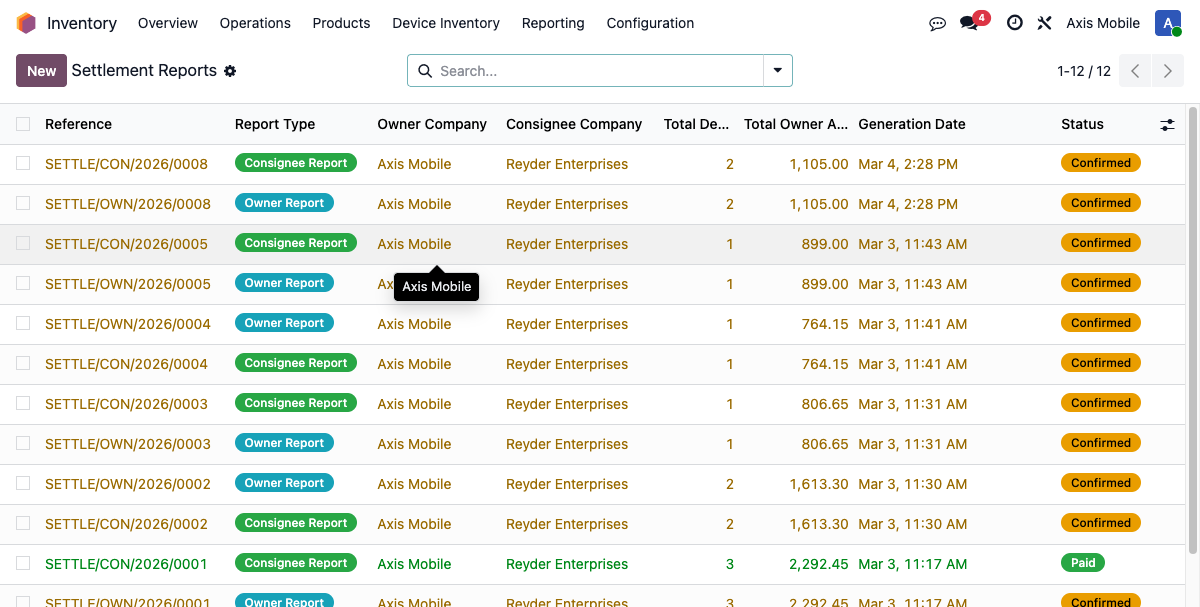
Settlement reports are the financial reconciliation mechanism for consignment sales. When Reyder (consignee) sells Axis Mobile's (owner) devices, settlement reports track how much is owed to the owner.
Two Reports Per Sale
Every consignment sale creates a paired set of reports:
- Owner Report (
report_type='owner',company_id=owner company): - Shows: IMEI, model, storage, grade, commission amount, owner amount
- Does NOT show: customer name, SO number, sale price
-
This is what Axis Mobile sees
-
Consignee Report (
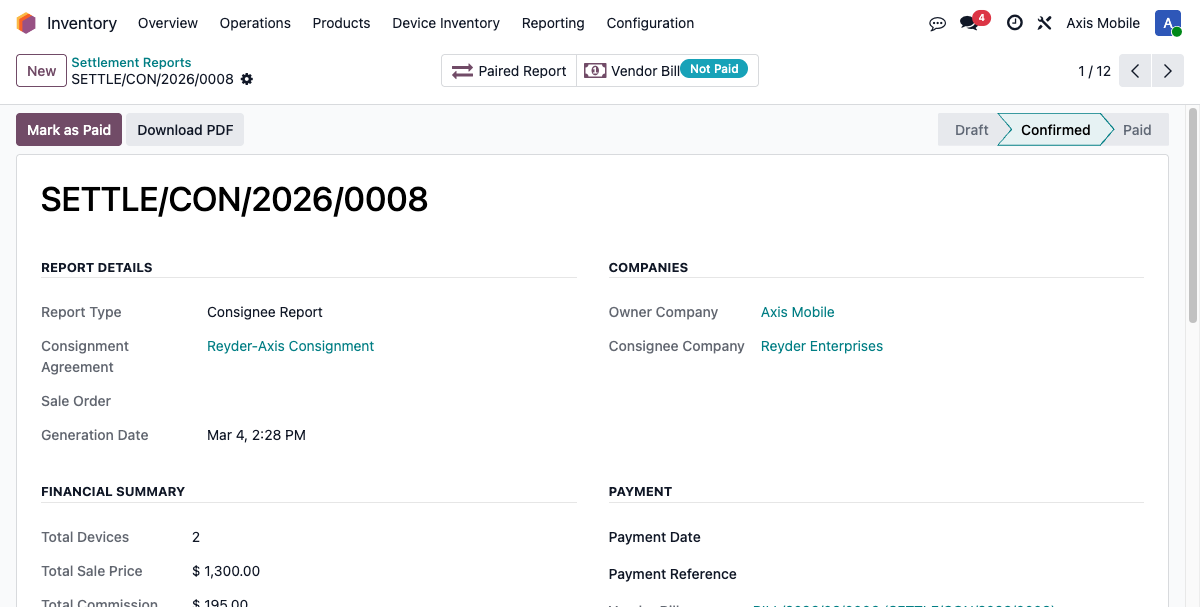
report_type='consignee',company_id=consignee company): - Shows: Everything — IMEI, model, storage, grade, sale price, customer name, SO number, commission, owner amount
- This is what Reyder sees
- Only the consignee report has
paired_report_idset (owner cannot navigate to consignee report)
Data Separation (Critical)
Data separation between owner and consignee is enforced at multiple layers:
- Record rules: Owner report
company_id= owner company (Axis Mobile) — the record rule('company_id', 'in', company_ids)restricts visibility so Axis Mobile users only see their own reports. Consignee reportcompany_id= consignee company (Reyder) — only Reyder can see it. paired_report_idasymmetry: This field is only set on the consignee report, pointing to the owner report. The owner report does not hold a reference back to the consignee report. This means an Axis Mobile user cannot traverse from their report to see Reyder's customer data.- Owner report line omissions: Owner report lines do not store
sale_price,sale_order_name, orcustomer_name. These fields are intentionally left blank when_create_single_report('owner', ...)is called, so even if an Axis user gains direct database access, the sensitive data is never written to their report records. - View-level enforcement: The
sale_order_idfield is hidden in the UI whenreport_type == 'owner'.
The combined effect: Axis Mobile can see their commission and owner revenue but cannot access Reyder's customers, sale prices, or sales order references under any normal circumstance.
Report Creation
Reports are created automatically by:
create_paired_reports(lot_ids, sale_order)method onconsignment.settlement.report- Called from
_process_customer_delivery()when a delivery manifest is marked complete - Called from
action_confirm()when a retail sale is confirmed - Uses
sudo()because the owner report belongs to a different company than the user creating it
Creation Process
- Acquires
FOR UPDATE NOWAITlocks on the relevant device records to prevent double-settlement race conditions. - Finds the active consignment agreement between the owner and consignee.
- Creates the owner report via
_create_single_report('owner', ...)— sensitive fields are omitted from lines. - Creates the consignee report via
_create_single_report('consignee', ...)— all fields populated. - Sets
paired_report_idon the consignee report only, pointing to the owner report. - Auto-confirms both reports immediately.
Report Lines
Each report has lines (consignment.settlement.report.line):
| Field | Owner Report | Consignee Report |
|---|---|---|
imei |
Yes | Yes |
product_name |
Yes | Yes |
storage |
Yes | Yes |
grade_name |
Yes | Yes |
sale_price |
No | Yes |
sale_order_name |
No | Yes |
customer_name |
No | Yes |
commission_amount |
Yes | Yes |
owner_amount |
Yes | Yes |
sale_date |
Yes | Yes |
Database constraint: UNIQUE(lot_id, report_id) — each device can appear only once per report, preventing duplicate settlement lines.
Report Lifecycle
Step 1: Confirm Report
action_confirm():
- Generates a PDF settlement statement.
- For the consignee report: calls _create_settlement_vendor_bill() to create the corresponding vendor bill.
- Reports are auto-confirmed on creation, so this step usually happens automatically without manual intervention.
Step 2: Vendor Bill Creation
_create_settlement_vendor_bill() creates an in_invoice (vendor bill):
- Created in the consignee company context using sudo().with_company().
- Vendor = owner company's partner (e.g., Axis Mobile).
- Amount = total_owner_amount (sale proceeds minus commission).
- Journal = settlement_journal_id configured in settings, with fallback to any available purchase journal.
- Auto-posted immediately upon creation.
- Stored on the consignee report as vendor_bill_id.
Step 3: Mark as Paid
Click the "Mark as Paid" button on the report. action_mark_paid():
- Updates settlement_status to 'settled' on all device records referenced by the report.
- Records the payment date.
- Both paired reports (owner and consignee) are updated together.
Report Totals
| Field | Description |
|---|---|
total_devices |
Count of device lines |
total_sale_price |
Sum of sale prices (always 0 for owner reports — field omitted) |
total_commission |
Sum of commission amounts |
total_owner_amount |
Sum of owner amounts (sale_price - commission) |
Menu Paths
| View | Path |
|---|---|
| All Reports | Inventory → Device Inventory → Consignment → Settlement Reports |
| Pending | Inventory → Device Inventory → Consignment → Pending Settlements |
| My Pending | Inventory → Device Inventory → Consignment → My Pending Settlements |
| Settlement Wizard | Inventory → Device Inventory → Consignment → Settlement Wizard |
PDF Download
Settlement reports can be downloaded as PDF statements. The PDF content is scoped to the report type:
- Owner PDF: Includes IMEI, model, storage, grade, commission amount, and owner amount only. Customer and sale order information is excluded.
- Consignee PDF: Includes all fields — IMEI, model, storage, grade, sale price, customer name, SO reference, commission, and owner amount.