Consignment Agreements
Who this is for
The operator (admin) and anyone setting up the Reyder ↔ Axis business relationship. Once an agreement is active and running, sales ops and warehouse don't need to touch it.
What you'll accomplish: create the agreement that lets Reyder see, sell, and earn commission on Axis Mobile's devices.
What a consignment agreement actually is
A formal record in the system that says:
"Axis Mobile owns these devices. They allow Reyder Enterprises to sell them and keep a commission. The commission is X."
Without an active agreement, Reyder can't see Axis's devices, can't allocate them to sales orders, and can't invoice customers for them. The agreement is the switch that connects the two companies.
There is one agreement per owner/consignee pair. A business can have multiple agreements for different pairs, but not two records for the same ordered pair.
Step 1 — Open the agreements list
Go to Device Ops → Consignment → Agreements.
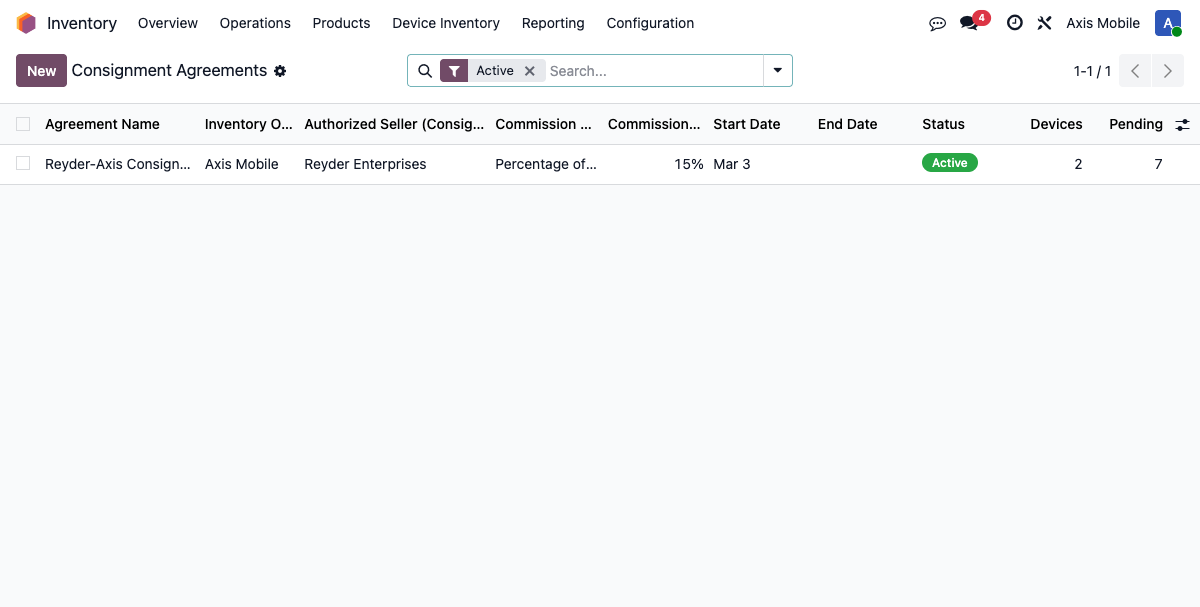
You'll see the active agreement (and any historical ones, filtered out by default). Click New to create one, or click an existing row to edit.
Step 2 — Fill in the form
Required
| Field | What to enter |
|---|---|
| Agreement Name | Descriptive — e.g. Reyder-Axis Consignment 2026 |
| Inventory Owner | The company that owns the phones. For Reyder/Axis, set this to Axis Mobile. |
| Authorized Seller (Consignee) | The company that will sell. Set to Reyder Enterprises. |
| Commission Type | See the commission guide below |
| Commission Rate | Depends on commission type |
Optional
| Field | What it does |
|---|---|
| Start Date | First day the agreement grants access (defaults to today; the date is included) |
| End Date | Last day the agreement grants access (included); leave blank for open-ended |
| Terms & Conditions | Free-text legal language |
Owner privacy is enforced by the workflow rather than chosen per agreement: the owner can reconcile device identity/status and the amount owed, while customer, order, sale price, sale date, and consignee commission stay private.
Step 3 — Pick a commission type
Percentage of sale (most common)
Reyder keeps a fixed % of each sale price. Axis gets the rest.
Enter the percentage shown to the user
To configure 15%, type 15 in the Commission Rate field. Odoo's percentage
widget converts that UI value to the stored decimal 0.15. Typing 0.15 in the
form would configure only 0.15%.
Examples at 15%:
| Sale Price | Commission | Axis Gets |
|---|---|---|
| $800 | $120 | $680 |
| $600 | $90 | $510 |
| $450 | $67.50 | $382.50 |
Fixed amount per device
Reyder keeps a fixed dollar amount per sale, regardless of price. Axis gets the rest.
Enter the dollar amount in Commission Rate — e.g. 50 for $50/device.
The system caps the commission at the sale price (it won't go negative on a cheap device):
| Sale Price | Fixed Commission | Axis Gets |
|---|---|---|
| $800 | $50 | $750 |
| $300 | $50 | $250 |
| $40 | $40 (capped) | $0 |
None
No commission. Axis receives the full sale price. Used for internal transfers or special cases where Reyder waives the fee.
Step 4 — Activate the agreement
Click Activate.
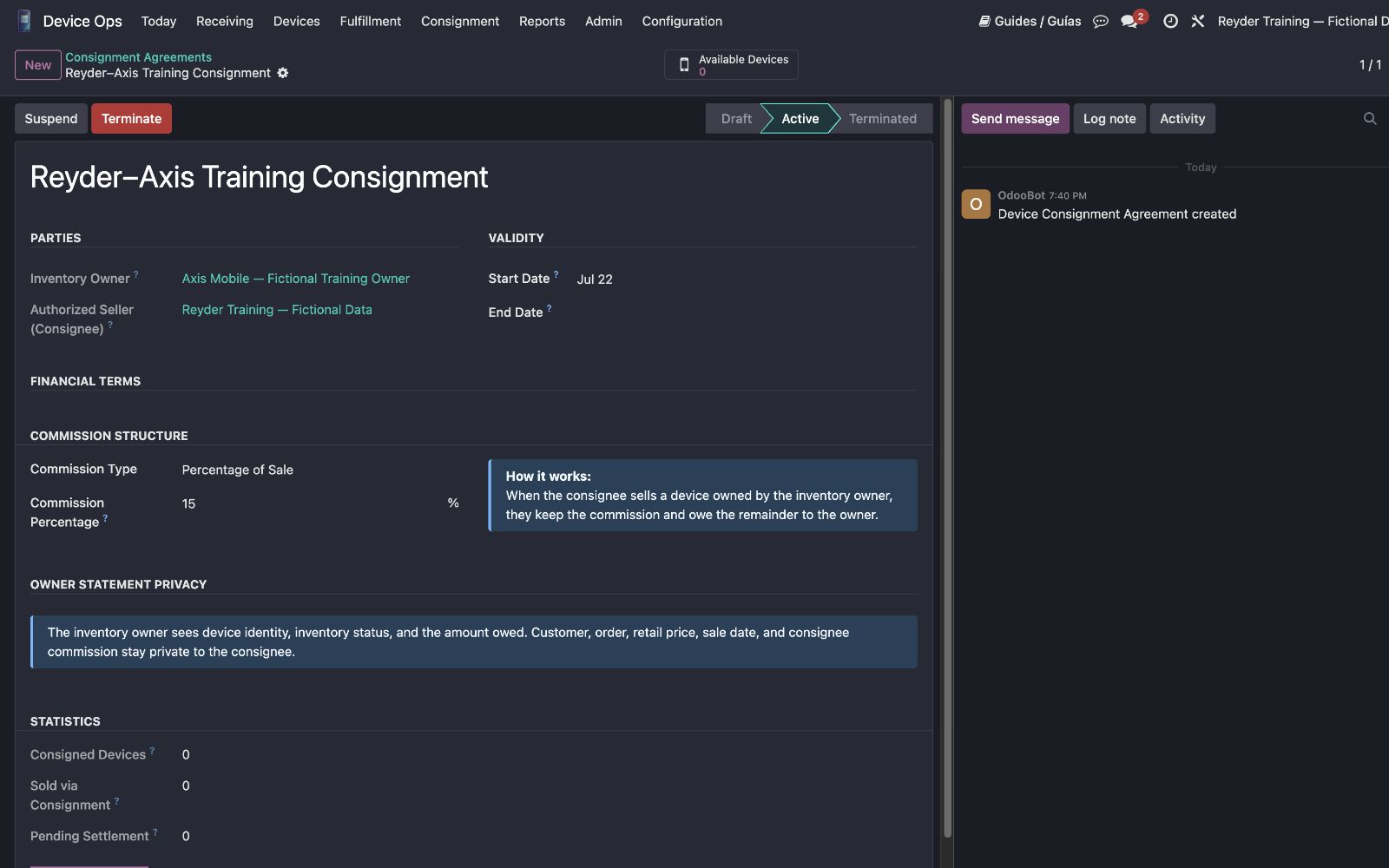
An agreement grants access only while it is Active and today's date is between its Start Date and End Date. If Start Date is today (the default), activation makes Axis's devices appear immediately. A future Start Date waits until that day; after End Date, access closes automatically. Go to All Devices and verify with a Reyder-only user.
Agreement states
| State | What it means | Can Reyder sell Axis devices? |
|---|---|---|
| Draft | Created but not in force | No |
| Active | Operational when today is inside its date range | Yes, during that range |
| Suspended | Temporarily paused | No |
| Terminated | Permanently ended | No |
Use Suspend to temporarily halt sales (e.g. during a dispute). Use Terminate when ending the business relationship.
Changing the commission rate mid-agreement
You can edit the Commission Rate directly on the active agreement — no need to terminate and recreate. Save the form and the new rate applies to future allocations from that moment forward.
What the rate change does NOT affect:
- Already-allocated devices keep the commission rate they were allocated at.
- Already-sold devices and their settlement reports are historical and unchanged.
- Open/confirmed SOs with allocated devices keep their original commission.
To apply a new rate to an open order, de-allocate and re-allocate the devices — the re-allocation pulls the current rate.
Smart buttons on the agreement
The form shows three live statistics:
| Counter | What it shows |
|---|---|
| Available Devices | Clickable smart button for the owner's currently available devices |
| Sold via Consignment | Read-only statistic showing devices sold by the consignee |
| Pending Settlement | Clickable smart button (when nonzero) for sold devices not yet settled |
Use the two actual smart buttons to open their device lists. Sold via Consignment is a number only, not a button.
Common problems
I can't see Axis's devices as a Reyder user
Check both controls: the agreement must be Active, and today must be on or after
Start Date and on or before End Date. Also check that you're logged in with a Reyder
user (not Axis), since access is company-scoped. Admin is a member of both, so test
with a Reyder-only user to verify.
Commission isn't being calculated on new allocations
Most likely causes: (a) no Active agreement that is in its valid date range between
the owner and consignee, or (b) the device's owner_company_id is Reyder, meaning
Reyder owns it directly and no consignment commission applies.
??? question '"Only one agreement allowed between the same companies" error on create' There is already an agreement for that owner/consignee pair, including possibly a Terminated one. Open the existing agreement and preserve its history. If authorized, use Reset to Draft, review the terms, and activate it again; do not delete a record that has operational history merely to bypass the uniqueness control.
I changed the commission rate but old orders didn't update
That's by design. Historical allocations keep the rate they were created with to preserve accounting integrity. For an open order, de-allocate and re-allocate the devices to pick up the new rate.
What's the difference between Suspended and Terminated?
Suspended is a reversible pause — click Reactivate to resume. Terminated is the deliberate hard stop. If the relationship is formally restarted, an authorized admin can Reset to Draft, review all terms, and activate the same record so its history is retained.